
日本語 · Camera, photo, text and voice · Offline
The Japanese photo translator that reads kanji, hiragana and katakana offline.
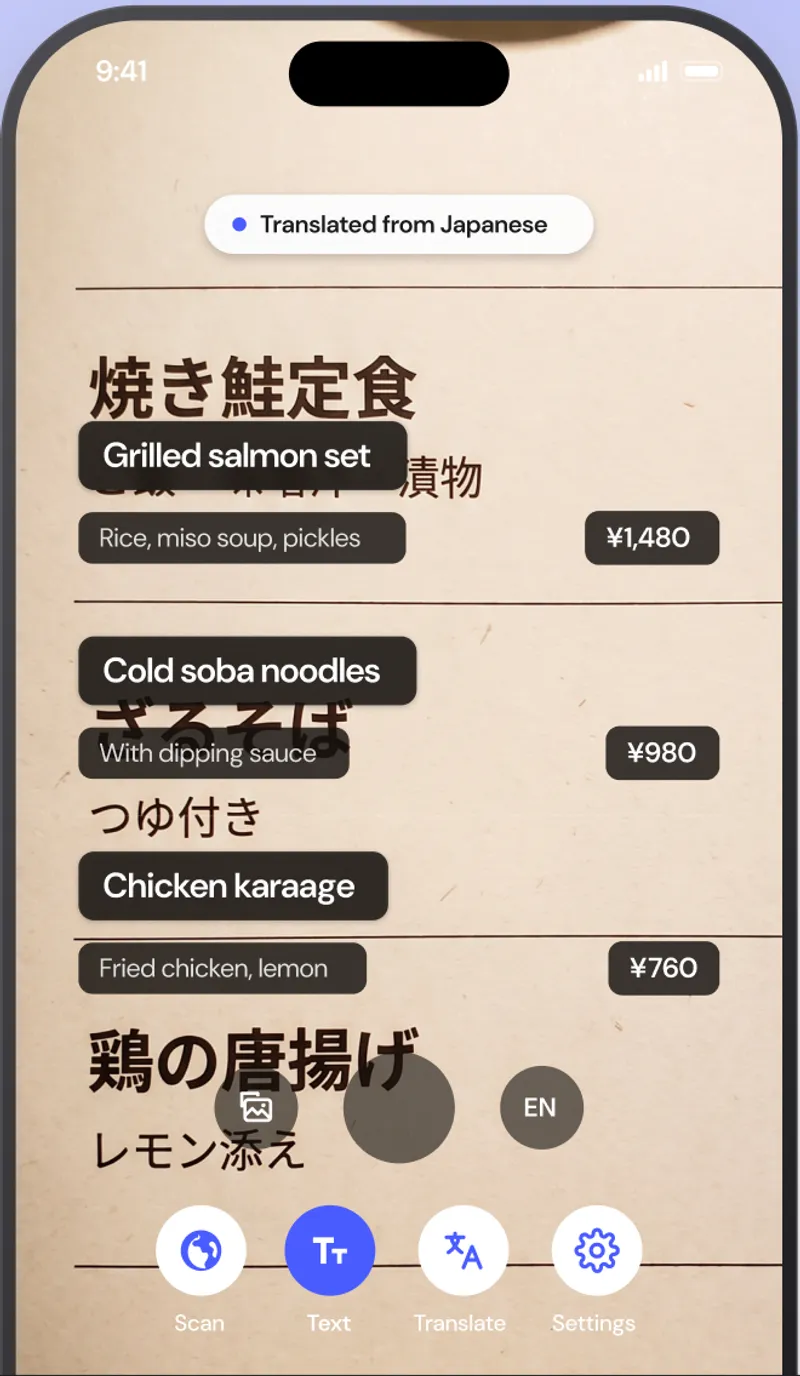
AI Translate reads Japanese with your phone camera and shows the English translation on top of the original text, so a ramen menu, a train-station sign or a convenience-store label becomes readable in about a second. The Japanese pack downloads once and then works with no internet, which matters in Japan where free Wi-Fi usually needs a login and roaming is expensive.
Free with your language pair · Premium from $1.99/month
Quick facts about the Japanese translator
- Script
- kanji, hiragana and katakana
- Camera translation
- Yes, live overlay and photo import
- Works offline
- Yes, after a one-time pack download
- Object scanner
- Yes, names 1,000+ objects in Japanese and English
- Pronunciation
- Audio plus romaji
- Account required
- No
What you can translate
Where a Japanese translator earns its place on your home screen.
Menus with no pictures
Izakaya, ramen and set-meal menus are often handwritten on boards or printed only in kanji. Point the camera and the dish names, descriptions and prices appear in English in place.
Stations and street signs
Exit numbers, platform notices and neighbourhood signs are translated live, so you can keep walking instead of stopping to type.
Packaging and allergens
Read ingredient lists, cooking instructions and allergy warnings on konbini food, medicine boxes and cosmetics.
Common Japanese phrases
What you will actually see on signs and menus.
A few of the phrases the app translates hundreds of times a day. Pronunciation shown in romaji.
| Japanese | English | Seen on |
|---|---|---|
| 焼き鮭定食yaki-zake teishoku | Grilled salmon set meal | menu |
| 出口deguchi | Exit | station sign |
| 営業中eigyō-chū | Open (for business) | shop door |
| 立入禁止tachiiri kinshi | No entry | sign |
| お会計お願いしますo-kaikei onegai shimasu | The check, please | restaurant |
How to
How to translate Japanese from a photo or sign
- 01
Download the Japanese pack
Open Settings, then Offline languages, and tap the download icon next to Japanese. It is about 30 MB and only needs to be done once.
- 02
Point the camera at the text
Open the Text tab and aim at the Japanese sign, menu or label. The English translation appears on top of the original text.
- 03
Freeze to read, or import a photo
Tap Freeze to hold the frame and read every line, or tap the photo button to translate a picture or screenshot you already have.
FAQ
Japanese translator questions.
Does the Japanese translator work without internet?
Yes. Download the Japanese pack (roughly 30 MB) once and camera, text, voice and object translation all work with airplane mode on.
Can it read kanji, hiragana and katakana?
Yes. The on-device Japanese text recognizer reads all three scripts, including mixed text like katakana loanwords inside kanji sentences.
Does it show romaji pronunciation?
Yes. Word cards and the object scanner show romaji under the Japanese, and you can tap the speaker to hear it.
Can it translate handwritten Japanese?
Printed and clearly hand-lettered text works best. Cursive handwriting is hit or miss, so for a handwritten board try the freeze button and hold the phone square to the surface.
Also useful
Read Japanese the moment you see it.
Download the Japanese pack once and translate signs, menus, labels and objects with no internet, no account and nothing uploaded.