
Italiano · Camera, photo, text and voice · Offline
The Italian photo translator that reads signs and menus offline.
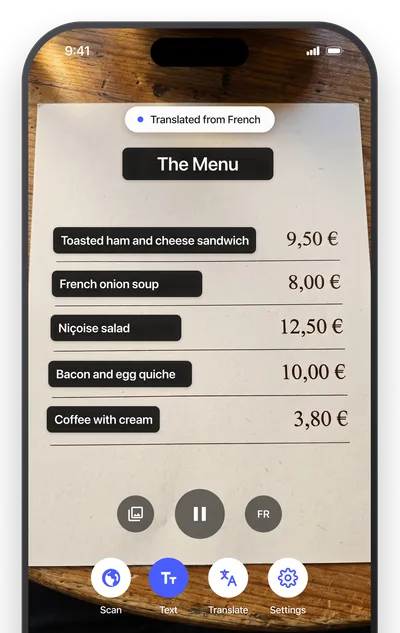
AI Translate translates Italian with your camera, from photos, from typed or spoken text and from objects, and once the Italian pack is downloaded the camera, photo and text translation work offline in Rome, on the Amalfi coast or in a hill town with one bar of signal.
Free with your language pair · Premium from $1.99/month
Quick facts about the Italian translator
- Script
- the Latin alphabet
- Camera translation
- Yes, live overlay plus photo import
- Works offline
- Yes, after a one-time pack download. Voice input depends on your phone.
- Object scanner
- Yes, names 1,000+ objects in Italian and English
- Pronunciation
- Audio
- Account required
- No
What you can translate
Where a Italian translator earns its place on your home screen.
Trattoria menus
Read antipasti, primi and secondi without guessing, including the daily specials chalked on the board.
Trains and museums
Trenitalia notices, validation instructions and exhibit captions are translated as you look at them.
Markets and pharmacies
Cheese counters, produce tags and medicine leaflets become readable in a second.
Common Italian phrases
What you will actually see on signs and menus.
A handful of phrases worth knowing before you go.
| Italian | English | Seen on |
|---|---|---|
| Uscita | Exit | sign |
| Piatto del giorno | Dish of the day | restaurant board |
| Vietato l'ingresso | No entry | sign |
| Quanto costa? | How much does it cost? | shop |
| Il conto, per favore | The check, please | restaurant |
How to
How to translate Italian from a photo or sign
- 01
Download the Italian pack
Open Settings, then Offline languages, and tap the download icon next to Italian. It is about 30 MB and only needs to be done once.
- 02
Point the camera at the text
Open the Text tab and aim at the Italian sign, menu or label. The English translation appears over the original text, block by block.
- 03
Freeze it, or import a photo
Tap Freeze to hold the frame while you read. For a picture or screenshot you already have, tap Import photo and the translated text opens in a sheet you can copy.
FAQ
Italian translator questions.
Does the Italian translator work offline?
Yes. Once the Italian pack is downloaded, camera, photo and text translation work without any connection.
Can I hear the Italian pronunciation?
Yes. The Translate tab and the Scan tab have speaker buttons that read the Italian aloud with your phone's voices. Written phonetic spelling is shown for English and Spanish words, not Italian.
Does it read handwritten menu boards?
Clear hand-lettering usually works. Cursive chalkboards are hit or miss, so hold the phone square to the board and tap Freeze.
Guides
-
French Phrases for Travel: Greetings, Food and Directions
French phrases for travel: greetings, please and thank you, ordering in a café, asking directions and emergencies, with simple sound guides and offline tips.
-
Common Italian Phrases for Travel With Pronunciation
Common Italian phrases for travel: greetings, please and thank you, ordering food, directions and emergencies, with simple sound guides and offline tips.
-
How to Translate Spanish to English Audio on Your Phone
Translate Spanish to English audio with your phone: speak or play Spanish, read the English, hear it aloud, and learn what works offline and what does not.
-
French Street Signs: What the Words Mean in English
French street signs in English: rue, impasse and place on name plaques, plus priorité à droite, parking, péage and words to know before driving in France.
-
Italian Road Signs: What the Words Mean in English
What Italian road signs mean in English: ZTL zones, parking lines, autostrada tolls and warning sign words, plus how to translate a sign with your phone.
-
Signs in Spanish: Common Signs and What They Mean in English
Signs in Spanish explained: the words on exit, push, pull, restroom, warning and road signs, their English meaning, and how to translate one with your phone.
-
German Road Signs: What the Words Mean in English
What German road signs mean in English: the words on Autobahn, parking and warning signs, the rules behind them, and how to translate a sign with your phone.
-
Menu in Italian: Il Menù, La Carta and How to Read One
How to say menu in Italian, what il menù, la carta and menù fisso mean, and the course names, cooking words and phrases you need to order well.
-
Menu in German: Speisekarte, Menü and How to Read One
How to say menu in German, why die Speisekarte and das Menü mean different things, and the section names, cooking words and phrases you need to order.
-
Menu in French: La Carte, Le Menu and How to Read One
How to say menu in French, what la carte, le menu and la formule mean, and the course names, cooking words and phrases you need to order with confidence.
-
Spanish Menu Guide: Words, Dishes and How to Translate Them
Read a Spanish menu with confidence: section names, common dishes, cooking terms and allergy phrases, plus how to translate one with your phone camera offline.
-
How to Translate German to English From a Picture
Translate a German to English picture on your phone with the live camera or a saved photo, offline too. Tips for umlauts, ß, long compounds and Gothic fonts.
-
Best Offline Translator Apps: What Works Without Internet
Which translator apps work offline, what each one does with no signal, and how to set up your phone before you fly. Camera, photo, voice and text compared.
Related translators
Read Italian the moment you see it.
Download the Italian pack once to translate signs, menus, labels and objects offline. No account, no ad trackers, photos never uploaded.